Why Is My Table Saw Kicking Back? 9 Causes and How to Stop It
A table saw is one of the most useful tools in a woodworking shop, but it can also become dangerous when the workpiece suddenly moves backward toward the operator.
If you have experienced this, you may be wondering, why is my table saw kicking back?
Table saw kickback usually occurs when the workpiece becomes trapped, pinched, or lifted by the rotating blade and is thrown back toward the operator. Common causes include a misaligned fence, improper blade alignment, a closing kerf, warped lumber, incorrect feeding technique, or cutting without a properly aligned riving knife.
Kickback should never be ignored. If it happens repeatedly, stop using the saw and identify the underlying problem before making another cut.
Why Is My Table Saw Kicking Back?
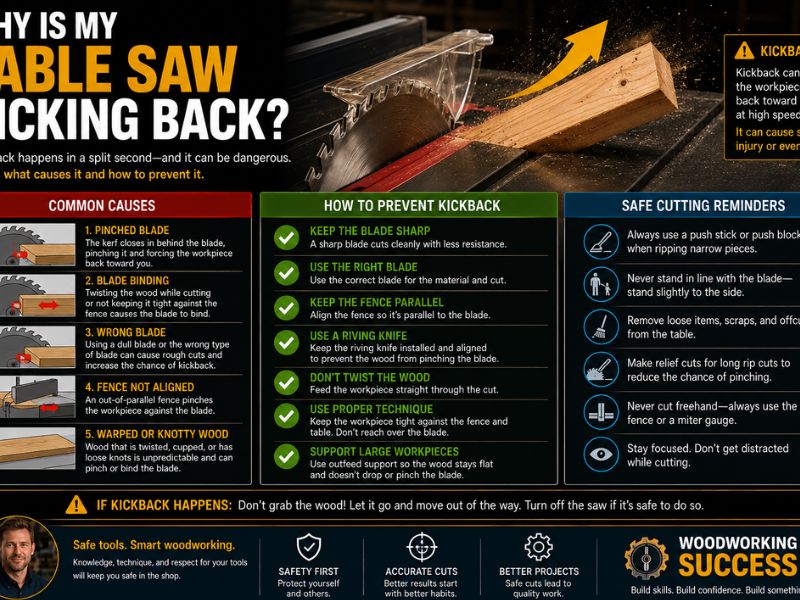
Table saw kickback happens when the blade catches the workpiece and rapidly pushes it backward.
The blade rotates toward the operator at the top of its rotation. If the material becomes trapped against the back portion of the blade, the spinning teeth can grab the wood and accelerate it backward.
Several conditions can make this more likely:
- Misaligned fence
- Misaligned blade
- Wood pinching the blade
- Warped or twisted lumber
- Incorrect feeding technique
- Missing or misaligned riving knife
- Incorrect cutting setup
- Dull or inappropriate blade
- Offcuts becoming trapped
Kickback can happen very quickly, so prevention is much more important than trying to react after it begins.
9 Common Causes of Table Saw Kickback
1. The Fence Is Misaligned
A misaligned fence is one of the most common causes of kickback during ripping.
The fence should be properly aligned with the blade and miter slot according to the saw manufacturer’s specifications.
If the fence pushes the workpiece toward the blade as the cut progresses, the wood can become trapped between the fence and blade.
That creates friction and increases the chance that the blade will grab the workpiece.
A fence that is not properly aligned can also cause:
- Burn marks
- Difficult feeding
- Uneven cuts
- Pinching
- Kickback
If your saw suddenly starts burning wood and kicking back, fence alignment should be one of the first things you inspect.
2. The Blade Is Not Properly Aligned
The blade must also be correctly aligned with the saw’s miter slot.
If the blade is slightly angled relative to the slot, the workpiece may contact the blade unevenly during a rip cut.
This can create additional friction and cause the material to move unexpectedly.
Check the blade-to-miter-slot alignment using the procedure recommended by your table saw manufacturer.
Also inspect the blade and arbor for damage or excessive runout.
3. The Wood Pinches the Blade
Wood can pinch the blade when the kerf closes around it.
This can happen because of internal stress in the lumber.
For example, a board may release tension as it is cut. One side of the board can move toward the blade, narrowing the kerf.
When that happens, the blade may become trapped between the two sides of the workpiece.
The rotating teeth can then grab the material and cause kickback.
4. You Are Feeding the Wood Incorrectly
The way you feed material through a table saw matters.
The workpiece should be guided smoothly and consistently through the blade while remaining properly supported.
Avoid:
- Pushing the wood from an awkward angle
- Losing contact with the fence
- Reaching over the blade
- Using your hands too close to the cutting area
- Forcing the material through the blade
Use appropriate push sticks or push blocks when the cut requires them.
5. The Workpiece Is Warped or Twisted
Not all lumber is suitable for a particular table saw operation.
A board that is badly bowed, cupped, or twisted may not stay flat against the table and fence.
As the board moves through the blade, it can shift unexpectedly and pinch the blade.
This increases the risk of kickback.
Inspect the board before cutting. If it cannot remain stable and properly supported, use another cutting method or prepare the material appropriately.
6. You Are Cutting Without a Riving Knife or Splitter
A riving knife helps keep the kerf open behind the blade.
This can reduce the chance of the workpiece closing against the rear of the blade.
A properly aligned riving knife follows the blade and helps maintain separation between the two sides of the cut.
Whenever your saw and cutting operation allow it, use the manufacturer’s recommended riving knife or splitter.
It is an important part of the saw’s safety system.
7. The Blade Height or Setup Is Incorrect
Blade setup can also affect cutting behavior.
A blade that is positioned incorrectly for the operation may create unnecessary resistance.
The blade should be set according to the saw manufacturer’s recommendations for the specific cut.
You should also make sure the blade is:
- Correctly installed
- Sharp
- Appropriate for the material
- Properly tightened
- Free from damage
A damaged or unsuitable blade can make the cut more difficult and increase the chance of binding.
8. You Are Using the Wrong Cutting Technique
Some table saw operations require different tools or setups.
For example, using the rip fence as a guide for certain crosscutting operations can create a situation where an offcut becomes trapped between the blade and fence.
For crosscuts, a miter gauge or appropriate crosscut sled is generally used instead of relying on the rip fence alone.
Likewise, freehand cutting on a table saw is not an appropriate substitute for a properly guided operation.
Use the correct setup for the type of cut you are making.
9. The Workpiece or Offcut Gets Trapped
During a cut, a small offcut can become trapped between the blade and fence.
As the blade continues rotating, it may grab the loose piece and throw it backward.
This is one reason cutting technique and workpiece positioning are so important.
When making a rip cut, make sure the workpiece is properly supported and that the cut-off portion has somewhere safe to go.
Do not allow loose pieces to become trapped against the rear of the blade.
How to Stop a Table Saw From Kicking Back
If your table saw has kicked back, do not simply continue cutting.
Stop the saw and inspect the setup.
Check and Align the Fence
Verify that the fence is correctly aligned according to the manufacturer’s specifications.
The fence should guide the workpiece without forcing it into the blade.
Align the Blade With the Miter Slot
Check that the blade is properly aligned.
Even a small alignment problem can affect the cut and create unwanted friction.
Use a Riving Knife or Splitter
Keep the appropriate riving knife or splitter installed whenever the operation allows it.
Make sure it is correctly aligned with the blade.
Use Proper Push Sticks and Push Blocks
Push sticks allow you to keep your hands farther away from the blade while maintaining control of the workpiece.
Use them whenever appropriate for the cut.
Keep the Workpiece Flat and Stable
The material should remain properly supported against the table and fence.
Do not attempt to cut unstable, severely warped lumber without an appropriate setup.
Maintain a Consistent Feed
Feed the workpiece smoothly without rushing or stopping unnecessarily.
Do not force material through a blade that is struggling.
Use the Correct Blade
Select a blade appropriate for the material and operation.
A sharp, properly installed blade will generally cut more efficiently than a damaged or unsuitable one.
Why Does My Table Saw Kick Back at the End of a Cut?
If kickback happens near the end of a rip cut, the wood may be moving as internal stress is released.
As the board passes through the blade, the kerf can close behind it.
The board may then press against the blade and create a dangerous pinching condition.
Another possibility is that the cut-off portion becomes trapped between the blade and fence.
If you notice the wood suddenly moving toward the blade, binding, or becoming difficult to push, stop the operation.
Do not try to force the board through the remaining portion of the cut.
Why Does My Table Saw Kick Back When Ripping?
Ripping involves cutting along the grain, so the workpiece is typically guided along the fence.
Kickback during ripping can be caused by:
- Fence misalignment
- Blade misalignment
- Pinching
- Warped lumber
- Incorrect feeding
- Missing riving knife
- Poor workpiece support
The fence and blade should work together to guide the material through the cut without trapping it.
If your saw repeatedly kicks back during rip cuts, stop using it until the setup has been checked.
Can a Dull Blade Cause Table Saw Kickback?
A dull blade can contribute to conditions that increase the risk of kickback.
A dull blade creates more resistance and may require greater force to push the workpiece through the cut.
This can make the operator more likely to push unevenly or force the material.
A dull blade may also cause:
- Burning
- Slow cutting
- Rough edges
- Increased motor load
- Excessive vibration
A dull blade is not necessarily the direct cause of every kickback event, but replacing or sharpening it can improve cutting performance and reduce unnecessary resistance.
Does a Riving Knife Prevent Kickback?
A riving knife can significantly reduce the risk of certain types of kickback by helping keep the kerf open behind the blade.
However, it does not make kickback impossible.
Kickback can still occur because of:
- Incorrect feeding
- Improper cutting technique
- Trapped offcuts
- Warped lumber
- Incorrect fence alignment
- Other setup problems
The riving knife should be properly aligned and positioned according to the saw manufacturer’s instructions.
What Should You Do If Your Table Saw Kicks Back?
If a kickback occurs, stop the operation.
Do not immediately restart the saw and attempt the same cut again.
Stop the Saw Safely
Turn the saw off and allow the blade to stop completely.
Disconnect Power Before Inspection
Before making adjustments, cleaning the saw, or inspecting the blade and fence, disconnect the power according to the manufacturer’s instructions.
Inspect the Blade and Fence
Look for:
- Misalignment
- Damage
- Loose components
- Dull teeth
- Incorrect positioning
Check the Workpiece
Examine the lumber for:
- Warping
- Twisting
- Internal stress
- Pinching
- Other defects
Identify the Cause First
Do not assume that kickback was random.
Repeated kickback usually means there is a problem with the saw setup, workpiece, blade, or cutting technique.
Table Saw Kickback Safety Tips
Good habits can significantly reduce the risk of kickback.
Stand Out of the Direct Line of the Blade
Position yourself so you are not directly behind the workpiece.
This can reduce your exposure if material is thrown backward.
Never Reach Over the Blade
Keep your hands away from the blade and use appropriate push devices.
Use Proper Guards
Keep the manufacturer’s recommended safety equipment installed whenever the operation allows it.
Use Push Sticks
Push sticks help maintain control while keeping your hands away from the cutting area.
Avoid Freehand Cuts
Use the appropriate fence, miter gauge, sled, or other guiding equipment for the operation.
Don’t Force the Material
If the workpiece binds or becomes difficult to feed, stop and determine why.
Keep the Workspace Clear
Remove unnecessary objects from around the saw so you can maintain stable footing and control.
Frequently Asked Questions
Why is my table saw kicking back?
Common causes include a misaligned fence or blade, wood pinching the blade, warped lumber, incorrect feeding technique, a missing or misaligned riving knife, trapped offcuts, and an inappropriate cutting setup.
How do I stop my table saw from kicking back?
Check the fence and blade alignment, use a properly aligned riving knife, inspect the lumber, use the correct blade and cutting method, and maintain a controlled feed. If kickback continues, stop using the saw until the problem is identified.
Can a misaligned fence cause kickback?
Yes. If the fence pushes the workpiece toward the blade, the wood can become pinched between the fence and blade. This can increase friction and cause the blade to grab the workpiece.
Does a riving knife prevent kickback?
A properly aligned riving knife helps reduce the risk by keeping the kerf open behind the blade. However, it cannot prevent every possible cause of kickback.
Can a dull blade cause kickback?
A dull blade increases cutting resistance and can contribute to binding or poor feeding. While it may not be the only cause, a dull blade should be sharpened or replaced when necessary.
Why does my table saw kick back at the end of the cut?
The wood may be releasing internal stress and closing the kerf around the blade. An offcut can also become trapped between the blade and fence. Fence alignment should also be checked.
Should I stand directly behind a table saw?
No. Avoid standing directly in line with the blade and workpiece. Position yourself safely according to the saw manufacturer’s recommendations.
Final Thoughts on Why Your Table Saw Is Kicking Back
If you are wondering why is my table saw kicking back, don’t treat it as a normal part of woodworking. Kickback usually indicates a problem with the saw setup, workpiece, blade, or cutting technique.
Start by checking the fence alignment, blade alignment, and condition of the lumber. Make sure you are using the appropriate blade and that the riving knife is properly installed and aligned.
Your feeding technique also matters. Keep the workpiece stable, use appropriate push sticks or other safety devices, and avoid forcing material through the blade.
Most importantly, if your table saw kicks back repeatedly, stop using it until you identify and correct the cause. A properly aligned saw, suitable blade, stable workpiece, and correct cutting technique can make table saw operations much safer and more predictable.