
Why Is My Table Saw Burning Wood? 9 Common Causes and Fixes
A table saw should normally cut through wood smoothly without leaving dark, scorched marks along the cut. If you notice brown or black marks, smoke, or a strong burnt smell, something in the cutting process is creating too much heat.
So, why is my table saw burning wood? The most common causes include a dull blade, incorrect blade selection, pitch buildup, improper feed rate, fence misalignment, and problems with blade alignment. The type and condition of the wood can also contribute to burning.
Occasional burning can happen when cutting certain hardwoods, but persistent burn marks usually indicate that something needs to be corrected.
Why Is My Table Saw Burning Wood?
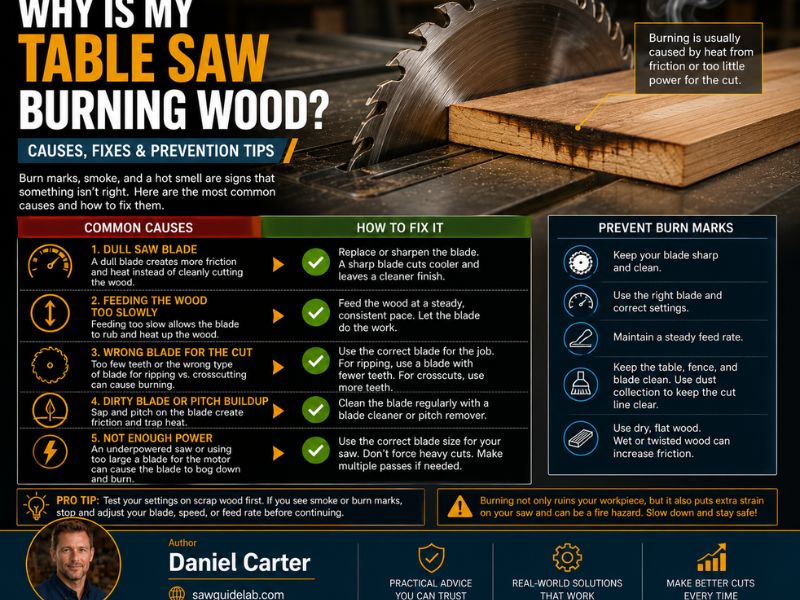
Wood burns when the friction between the blade and workpiece creates more heat than the cutting process can dissipate.
A properly functioning blade should remove material efficiently. When the blade is dull, dirty, improperly aligned, or forced through the wood incorrectly, friction increases.
Common causes include:
- Dull or damaged blade teeth
- Wrong blade for the type of cut
- Pitch or resin buildup
- Feeding the wood too slowly
- Feeding the wood too aggressively
- Misaligned fence
- Misaligned blade
- Incorrect blade height
- Wood that is hard, wet, warped, or under internal stress
Identifying the specific cause is important because simply replacing the blade may not solve the problem if the fence or blade alignment is also incorrect.
9 Common Reasons Your Table Saw Is Burning Wood
1. The Saw Blade Is Dull
A dull blade is one of the most common causes of burning.
Sharp teeth cut wood fibers efficiently. As the teeth become dull, they remove less material and generate more friction.
Signs of a dull blade can include:
- Burn marks
- Slower cutting
- Increased resistance
- More effort required to push the wood
- Rougher cuts
- Burning smell
- Excessive noise
If the blade is damaged or significantly worn, replacing it may be the best option. A quality blade can also be professionally sharpened when appropriate.
2. You Are Using the Wrong Blade
Different blades are designed for different types of cuts.
A blade optimized for crosscutting may not be ideal for ripping thick hardwood. Similarly, a general-purpose blade may not provide the best performance for every material.
The tooth count, tooth geometry, kerf, and blade design all affect cutting performance.
For example:
- Rip blades are designed for cutting along the grain.
- Crosscut blades are designed to cut across the grain.
- Combination blades are intended for general-purpose use.
Using the appropriate blade for the job can reduce friction and improve cutting performance.
3. The Blade Is Dirty or Has Pitch Buildup
Wood resin and pitch can accumulate on the blade teeth and body.
This buildup can interfere with cutting and increase friction.
A dirty blade may show symptoms such as:
- Burning
- Slower cutting
- Sticky residue
- Increased resistance
- Poor cut quality
If the blade is otherwise in good condition, cleaning it with an appropriate blade-cleaning product can restore performance.
Always remove the blade and follow proper safety procedures before cleaning it.
4. Your Feed Rate Is Too Slow
It may seem logical that pushing wood slowly would make cutting easier, but feeding too slowly can actually contribute to burning.
When the same section of the blade remains in contact with the wood for too long, friction can build up.
Try to maintain a smooth, consistent feed rate.
You should not rush the cut, but you also should not repeatedly stop or hesitate while the blade is cutting.
5. You Are Feeding the Wood Too Fast
The opposite problem can also occur.
If you push the workpiece too aggressively, the motor and blade can become heavily loaded.
This can cause:
- Motor strain
- Blade deflection
- Poor cut quality
- Increased friction
- Burning
The goal is not simply to feed faster or slower. The goal is to maintain a steady feed rate that matches the material, blade, and saw’s capacity.
6. The Fence Is Not Properly Aligned
A misaligned fence can cause the wood to pinch against the blade.
This is a particularly important issue because it can cause both burning and dangerous kickback.
Ideally, the fence should be properly aligned relative to the blade and miter slot according to your saw manufacturer’s specifications.
If the workpiece feels like it is being squeezed against the blade during a rip cut, stop the saw and check the fence alignment.
7. The Blade Is Not Properly Aligned
The blade itself must be properly aligned with the table saw.
If the blade is not parallel to the miter slot, the workpiece can rub against the blade unevenly.
This can create:
- Burning on one side
- Increased resistance
- Uneven cuts
- Blade deflection
- Potential kickback
Check the blade-to-miter-slot alignment using the procedure recommended for your particular table saw.
Also inspect the blade and arbor for damage or excessive runout.
8. The Blade Height Is Incorrect
Blade height can also affect cutting performance.
If the blade is set excessively high, more of the blade is exposed above the workpiece than necessary.
Many woodworkers set the blade so the teeth extend above the material by an appropriate amount while maintaining safe operation.
However, there is no single universal blade-height setting for every saw and cutting operation.
Follow your saw manufacturer’s recommendations and use safe cutting practices.
9. The Wood Itself Is Causing the Problem
Sometimes the table saw is working correctly and the material is the main reason for the burning.
Certain woods naturally create more resistance.
Potential troublemakers include:
- Dense hardwoods
- Resinous lumber
- Wet wood
- Warped boards
- Twisted boards
- Boards containing internal stress
A board can also move during a rip cut as internal tension is released.
If the kerf closes behind the blade, the wood can pinch the blade and create significant friction and heat.
How to Stop Your Table Saw From Burning Wood
If your table saw is leaving burn marks, work through the possible causes systematically.
Clean or Replace the Blade
Start by inspecting the blade.
If it is dirty, clean it appropriately. If the teeth are dull, damaged, or excessively worn, sharpen or replace the blade.
Check the Fence Alignment
Make sure the fence is correctly aligned according to your saw’s instructions.
A fence that causes the workpiece to pinch the blade can create both burning and kickback hazards.
Align the Blade With the Miter Slot
Check that the blade is properly aligned with the miter slot.
Even a small alignment issue can affect the quality of a rip cut.
Set the Correct Blade Height
Adjust the blade height appropriately for the material and operation.
Avoid unnecessarily exposing a large portion of the blade above the workpiece.
Maintain a Consistent Feed Rate
Feed the material smoothly.
Avoid both hesitation and excessive force.
Let the blade cut at a pace appropriate for the wood and your saw.
Choose the Correct Blade
Use a blade designed for the cut and material.
For example, a suitable ripping blade can make a significant difference when cutting hardwood along the grain.
Use Proper Dust Collection
Good dust collection helps keep the cutting area clear and can improve visibility.
It can also reduce the accumulation of sawdust around the saw.
However, dust collection alone will not solve a blade, alignment, or feed-rate problem.
Why Does My Table Saw Burn Wood Only at the End of the Cut?
If burning happens mainly near the end of a rip cut, the problem may be related to the wood moving as internal stress is released.
As the board passes through the blade, the kerf can close slightly behind it.
This can push the wood against the blade and create friction.
A fence that is not correctly aligned can contribute to the problem as well.
Pay particular attention to:
- Fence alignment
- Blade alignment
- Wood movement
- Internal stress
- Whether the kerf is closing behind the blade
If the wood suddenly begins pinching the blade, stop the operation rather than trying to force the cut.
Why Does My Table Saw Burn Wood on One Side?
Burning on only one side can indicate an alignment issue.
Possible causes include:
- Blade not parallel to the miter slot
- Fence misalignment
- Uneven blade runout
- Workpiece pressure against one side of the blade
- Wood movement during the cut
Inspect the blade and fence alignment first.
If the burning consistently appears on the same side across multiple boards, that pattern can provide a useful clue that the issue is related to the saw setup rather than the wood itself.
Can a Dull Table Saw Blade Cause Burning?
Yes.
A dull blade is one of the most common reasons for burning wood on a table saw.
Sharp teeth slice through the material efficiently, while dull teeth require more force and generate more friction.
Other symptoms of a dull blade may include:
- Rough cuts
- Slow cutting
- Increased motor load
- More noise
- Greater effort when feeding wood
- Burn marks
If cleaning the blade does not improve performance and the teeth are worn, sharpening or replacing the blade may be necessary.
How to Tell if the Problem Is the Blade or the Fence
It can sometimes be difficult to determine whether burning is caused by the blade or fence.
Start with a visual inspection.
Check whether:
- The blade is clean
- The teeth are sharp
- The blade is properly installed
- The fence is aligned
- The blade is parallel to the miter slot
You can also compare the results when cutting different pieces of wood.
If several different boards burn in the same location, the saw setup is more likely to be responsible.
If only one particular board burns, the wood may have internal stress, excessive density, moisture, or another material-specific problem.
Is Burning Wood on a Table Saw Dangerous?
Burn marks are more than a cosmetic problem.
Excessive friction can create enough heat to damage the blade and workpiece.
More importantly, the same conditions that cause burning can sometimes indicate a pinching problem.
For example, a misaligned fence or wood that closes around the blade can increase the risk of kickback.
Stop using the saw if:
- The blade binds
- Smoke is excessive
- The motor is struggling
- The workpiece is pinching the blade
- The blade appears damaged
- You hear unusual noises
Disconnect power before inspecting or adjusting the saw.
Never try to correct an alignment or blade problem while the machine is powered.
Frequently Asked Questions
Why is my table saw burning wood?
The most common causes are a dull or dirty blade, incorrect blade selection, slow or inconsistent feeding, fence misalignment, blade misalignment, incorrect blade height, or wood that is warped or under internal stress.
How do I stop my table saw from burning wood?
Start by checking the blade condition and cleanliness. Then verify blade and fence alignment, choose the appropriate blade for the cut, set the blade height correctly, and maintain a consistent feed rate.
Can a dull blade cause wood to burn?
Yes. A dull blade creates more friction because its teeth cannot cut the material as efficiently. This additional friction can generate enough heat to leave burn marks.
Should a table saw blade be higher or lower?
The correct blade height depends on the operation and the saw manufacturer’s recommendations. In general, avoid unnecessarily exposing more blade than required for the cut.
Does feed rate cause burning on a table saw?
Yes. Feeding too slowly can keep the blade in contact with the same area longer and increase heat. Feeding too aggressively can overload the blade and motor. A smooth, consistent feed rate is usually best.
Can a misaligned fence cause burning?
Yes. A fence that is not properly aligned can cause the workpiece to pinch against the blade, creating friction and burn marks. It can also increase the risk of kickback.
Final Thoughts on Why Your Table Saw Is Burning Wood
If you are wondering why is my table saw burning wood, start with the basics: inspect the blade, check for pitch buildup, verify the fence and blade alignment, and make sure you are using the correct blade for the cut.
Your feed rate also matters. Feeding too slowly can create excessive friction, while pushing too aggressively can overload the saw.
The wood itself can also be responsible, especially when cutting dense, resinous, warped, or internally stressed lumber.
Occasional burning does not necessarily mean your table saw is defective. But if burn marks appear consistently, especially on different types of wood, stop and troubleshoot the setup before continuing.
A sharp, clean blade, proper alignment, appropriate blade height, and steady feeding technique will usually go a long way toward producing cleaner cuts without excessive burning.